Showing posts with label private stage 3. Show all posts

Monday, July 8, 2019

Ground Lesson 9: Performance, weight & balance and flight computers

  • Predicting performance
    • Your ability to predict the performance of an airplane is very important
    • It allows you to
      • Takeoff distance
      • If you can safely clear obstacles in your departure path
      • How long it will take to reach a destination
      • Fuel requirements
      • Landing distance

    • Most of this information can be found in the POH
  • Aircraft performance and design
    • When developing performance charts, the manufacturer's make certain assumptions about conditions of the airplane and ability of the pilot
      • The pilot
        • Expected to follow normal checklist procedures  
        • Perform each of the required tasks correctly and at the appropriate time
      • The airplane
        • Assumed to be in good conditions, with a properly tuned engine and all systems operating normal
    • With the aid of these assumptions, the manufacturers develop performance data based on actual flight tests
  • Chart presentations
    • All performance charts apply to specific aircraft's
      • You should only refer to the aircraft's POH for the model you are going to fly
    • Generally present their info in either table or graph format
    • Table format
      • Find row and column that most closely match the conditions, and read the value
    • Graph format
      • Has more variables built into it, making it faster and accurate
  • Factors affecting performance
    • Two main factors are weight and wind
      • The heavier you are, the more lift you need → giving you less power for thrust
    • Wind can help or also hinder performance 
      • Airplanes taking off or landing in strong wind have reduced ground roll
      • In cruising flight, the groundspeed and time en route vary depending on the direction and speed of the wind
    • Atmospheric conditions can decrease air density, Increasing the apparent altitude
      • As pressure decreases, there are fewer air molecules in a given volume, so air density decreases
      • When air is warm, it contains fewer air molecules than colder air
      • Air containing water vapor is less dense than dry air
    • Since aircraft performance decreases with altitude, it follows that decrease in air density due to temperature, pressure, or humidity will also reduce performance 
      • When the air is less dense, the wings must move thru the air faster to produce enough lift for takeoff
      • Lower air density also reduces engine power, since the engine must take a larger amount of air for combustion
  • Takeoff and landing performance
    • Depends on several factors you can measure and calculate in advance such as 
      • Weight
      • Wind
      • Runway conditions
    • Aircraft weight and configuration 
      • To generate sufficient lift for flight, a heavily loaded airplane must accelerate to a higher speed than the same airplane with a lighter load.
        • Since the acceleration will also  be slower, more runway will be needed
      • You can see the effects of weight on the takeoff/landing distance chart
    • Surface winds
      • takeoff/landing distance can be influenced by direction and speed of wind
    • Runway configurations 
      • Aircraft performance data generally specify a paved and level runway with a smooth dry surface
      • If any of these conditions are different, you must adjust the takeoff/landing distance
  • Climb performance
    • The POH lists airspeeds for a variety of climbing flight conditions 
    • Two of the most important are best angle-of-climb airspeed(Vx) and the best rate-of-climb airspeed(Vy)
    • Climbing speeds 
      • The Vx is usually used for obstacle clearance immediately after takeoff
        • Should be used to gain the maximum amount of altitude in the minimum horizontal distance
      • Vy is usually used after you cleared all obstacles during departure
        • Gives the best altitude gain in a given time
  • Cruise performance
    • Manufacturers of light airplanes provide cruise performance charts to indicate rate of fuel consumption, true airspeed, range, and endurance.
    • Must compensate for nonstandard conditions
  • Using performance charts
    • Charts are provided for determining takeoff, landing, climbing, and cruising information
Weight and balance
  • Importance of weight
    • Almost every aspect of performance is influenced by weight of the aircraft and its content
    • An overweight aircraft has a
      • Longer takeoff run
      • Higher takeoff speed
      • Reduced angle and rate climb
      • Reduced cruising speed 
      • Shorter range
      • Higher stalling speed
      • Longer landing roll
    • Loading an aircraft too heavily can dangerously decrease its performance, and increase risk of structural damage if you encounter turbulence or make a hard landing
    • Aircraft manufacturers do extensive testing to establish safe limits for aircraft loading
  • Importance of balance
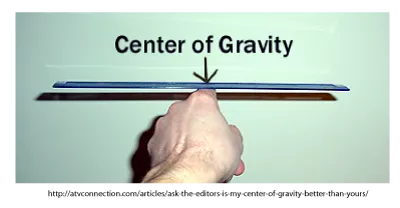
    • You can check the balance conditions of an airplane by locating its center of gravity(CG)
      • Imaginary point where the aircraft would balance if suspended
    • The location of this point is critical for the aircraft's stability and elevator effectiveness
    • Improper balance of the airplanes load can result in serious control problems 
    • You can avoid these problems by locating the CG before each flight and making sure it stays within limits
  • Terminology
    • Empty weight
      • aircraft itself 
      • Avionics
      • Unusable fuel
    • Gross weight
      • Sum of the empty weight and useful load
    • Max gross weight
      • Maximum allowed weight to fly
    • Useful load
      • People 
      • Cargo
      • Fuel
    • Payload
      • Load that pays → passengers, cargo, baggage
    • Ramp weight 
      • Airplane loaded for flight prior to engine start up
    • Takeoff weight
      •  Maximum weight at which the pilot is allowed to attempt to take off
    • Landing weight
      • Maximum aircraft gross weight due to design or operational limitations at which an aircraft is permitted to land

    • Center of gravity 
      • The theoretical point where the weight is concentrated
      • CG moves when weight shifts
    • Datum
      • A fix from where measurements are taken 
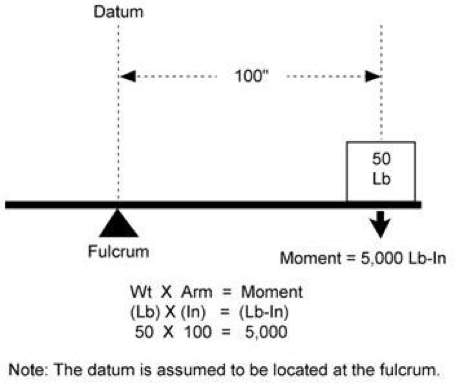
  • Principles of weight and balance
    • Arm of an object
      • Horizontal distance from the datum to any point
      • Total moment / total weight = total arm
    • Moment of an arm
      • Is the result of a multiplication made between an object and weight
      • Force acting on an object weight from a distance
    • Total moment
      • All moments from an object added together
    • Calculating the position of the CG
      • Moment divided by weight
    • Cg allowable range
      • A range of position within an object where Cg is allowed
    • Lateral
      • Left or right of the vertical plane through the mast
      • From nose to tail
      • Left is “-“, right is “+”
    • Longitudinal
      • Forward or aft of the datum line
        • Forward is “-“. aft is “+”
    • Weight and balance management 
      • Adding/ subtracting objects changes the weight and balance calculations
      • Cg change of an object
        • Change of equip. , payload, fuel, changes the cg of the aircraft
        • During flight, fuel is consumed, passengers are dropped, cg will shift
  • Computation method
    • Multiply weight and arm to get moment
    • Add weights and moments
    • Divide total moment by total weight
  • Table method
    • Uses a series of tables provided by the manufacturer to eliminate the multiplication and division
    • Moment table provided for each of the most common payload areas
      • Front seat
      • Rear seat
      • Usable fuel
      • Baggage area
    • The manufacturer has taken many weights and multiplied them by the arm for that location
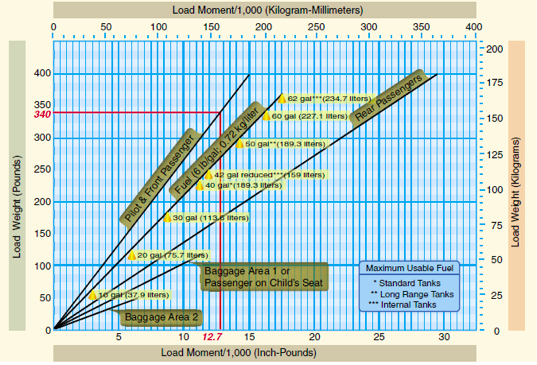
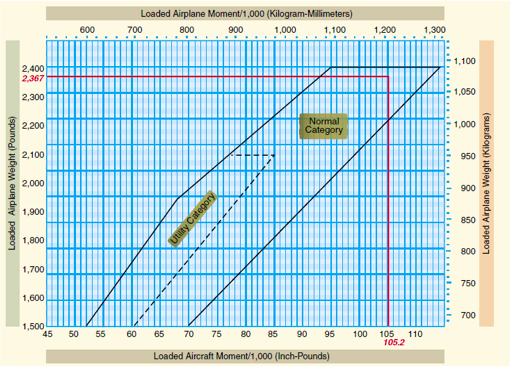
  • Graph method
    • Allows you to use values between increments published in a table
    • Loading graph used to find the moment for the loads you intend to put into the airplane
    • CG moment envelope tells you if your proposed loading is within the weight and balance limits

  • Weight-shift formula
    • Weight moved/weight of airplane = distance CG moved/ distance between arms
  • Effects of operating at high total weights
    • Wing must fly faster or at higher AoA to generate additional lift
    • Takeoff roll is longer - landing distance is longer
    • Angle and rate of climb is reduced
    • In cruise, range is reduced and speed is lowered at any given power setting
    • Closer to stalling angle, and stalls at higher speed
  • Flight at various CG positions


Flight computers
  • Mechanical flight computers
    • Flight planning and enroute navigation require solutions to several different types of mathematical problems 
      • The mechanical flight computer makes these common calculations easier 
    • Has two sides
      • Computer side
        • For ratio type problems, such as time, speed, distance, fuel, conversions 
      • Wind side
        • For wind drift calculations
  • Time, speed, and distance
    • If you have two variables , you can find the third
    • A scale is for distance, B scale represents time in minutes
    • Speed index always points to the speed
  • Airspeed and density altitude computations
    • As air density decreases, indicated airspeed will be lower than true airspeed by about 2% per 1000 feet of altitude
    • Use windows marked with pressure altitude/temperature 
      • For TAS calculation, use the scale on the right of the DA window
      • To calculate DA, use the same scale, and set the pressure altitude opposite the OAT, read the DA in the center window
  • Wind problems
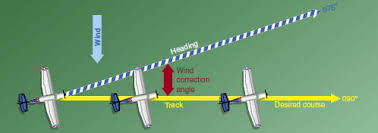
    • Correcting for wind drift
      • Pointing the nose slightly towards the wind will keep you on course
  • Conversions
  • Multi-part problems
    • Sometimes you may have to solve a series of related problems to to obtain a particular solution
    • Example: to find the fuel required for a proposed flight, you must first find the true airspeed, then ground speed and time enroute, then fuel required
  • Electronic flight computers
Ground Lesson 10: Pilotage, dead reckoning and radio navigation

Pilotage and dead reckoning


  • Pilotage
    • Visual navigation relying on maps/ landmarks such as rivers, roads, cities, others
    • Preflight planning for pilotage begins with obtaining a correct and current chart
    • Arrange chart so that you can easily see the whole route 
    • Decide the areas you would like to avoid (airspace's, mountains, etc)
    • Use a plotter to measure the length of your course in NM, and use a pencil to mark the course
    • Select checkpoints in between departure and destination, you want to always know your location
  • Dead reckoning
    • Navigation based on calculations on time, speed, distance, and direction
    • The compass provides the necessary directional info
    • Course direction is measured with a plotter
    • Draw your course on the chart as you would for a pilotage flight, including distance, fuel, other
  • Flight planning
    • Do as much as possible on the ground
    • Make checkpoints
    • Determine the effects of wind
    • Right down all frequencies you may need
  • VFR cruising altitudes
    • Many factors help decide your altitude
      • Height above terrain and obstruction
      • The higher you are the more time you have to find an emergency landing spot
    • When in level cruising flight at 3000 feet above the surface, you must comply with VFR cruising altitudes rule
      • VFR aircraft's on heading from 0º to 179º are required to fly at odd thousand-foot altitudes + 500 feet
      • VFR aircraft's on heading from 180º to 369º, you must fly evens + 500 feet
      • If you are maneuvering, turning, or changing altitude, the rule does not apply
    • The reason for this is traffic separation
  • Flight plan
    • When you file a flight plan with FSS, a record is made that provides your flight info
      • Flight plan will be kept on file for 1 hour
    • Once airborne, you activate your flight plan so FSS can keep track of your ETA
    • If you do not close or extend your flight plan within 30 minutes after your stated ETA, the FSS will begin a preliminary search by telephone, then notify search and rescue organizations 
    • Flight plan should include provisions to start a search and rescue if you fail to arrive
      • Use VFR flight plan service provided by the FSS
  • Lost procedures
    • 5 C’s
      • Climb
        • Usually helps you see more of the ground
        • Improves reception range of your radio and navigation equipment
      • Communicate
        • Available facilities
      • Confess
        • To ATC
      • Comply
        • ATC instructions
      • Conserve 
        • fuel
VOR navigation
  • How they work
    • Very high frequency omnidirectional range
    • Sends out two different signals. One master and one secondary 
      • Master signal is constant for each radial
      • Secondary signal rotated about the station
    • Receiver compares the two signals and can tell you where the selected radial is
    • Limited to line of sight
  • Station and radials
    • 360º
    • Radials are always from the station 
    • Oriented to magnetic north
  • VOR roughness
    • Minor CDI roughness brief flag alarm if flying over mountainous terrain
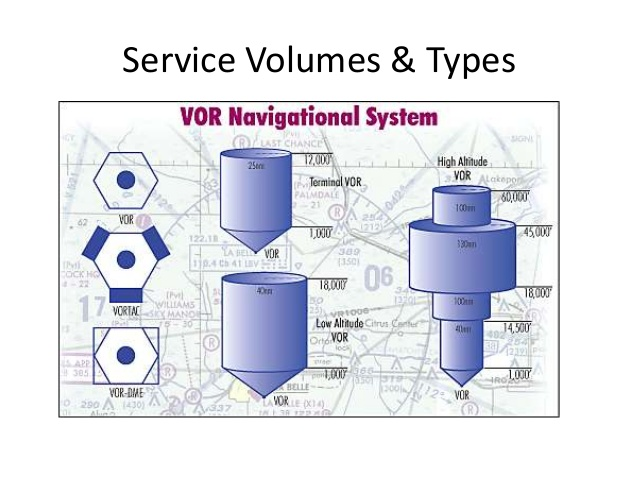
  • Standard service volumes

  • HSI
    • Combines vor and directional gyro
    • Also gives you glide slope
  • VOR navigation
    • Station ID
      • Find the Morse code on sectional or low en-route chart
      • Press ID button -> turn up volume -> listen to Morse code
      • During maintenance Morse code removed or send out test signal ( _••••_ )
    • Intercepting radial 
      • Take the difference between the radial you are on and the radial you want to intercept 
        • On radial 100 and want to intercept radial 120 -> 20º difference
        • Radial difference * 2 ( not less than 20º and not more than 90º intercept angle)
      • If flying to the station, always set course to reciprocal radial
      • Turn into the course
    • Tracking
      • Follow the selected radial
        • If the CDI goes to the left, turn to the left
          • Remember to correct for wind drift
    • Homing
      • Continuously twist the obs knob to center the CDI
    • Reverse sensing
      • When the CDI indicates the reverse of normal operations
      • This will happen to a basic VOR if you set it to the reciprocal of the intended course
    • Station passage
      • The CDI will be more sensitive the closer you get to the station 
      • Eventually oscillations and/ or full scale deflection 
        • Cone of confusion 
        • Nav flag may also appear
      • Station passage is complete with flag flip (to/from)
      • 1 NM from VOR maintain heading
VOR CHECKS
  • Has to be done every 30 days
  • VOT - VOR test facility
    • Transmits a test signal which can be found in the A/fd
    • Procedure
      • Tune in frequency in VOR receiver
      • Center the CDI needle
      • Should read 180º with a TO indications or 0º with FROM (think blink 182
      • Maximum error is +/- 4º
  • VOR receiver checkpoint
    • Frequency and radial can be found in A/fd
    • Procedure 
      • Tune in frequency in VOR receiver
      • Center CDI needle
      • Should read radial specified in A/fd with a from indication
      • Max error +/- 4º for ground check
      • Maximum error +/- 6º for airborne check
  • Dual VOR check
    • Used for 2 VOR independent from each other 
    • Maximum error is 4º between 2 receivers
  • VOR records
    • Each person making the check must enter the info in the aircraft or other records(91.171)
      • “D.P.E.S” date, place, error, signature
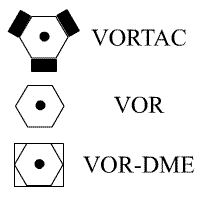
  • VOR, VOR DME, AND VORTAC
    • VOR provides course information
    • VOR.DME provides course and distance
    • VORTAC is both VOR and tacan
      • TACAN is used by military - provides course and distance
DME navigation
  • Distance measuring equipment
    • Works on line of site
    • Aircraft has a DME transmitter that send out radio frequency pulses 
      • A ground facility receives the signals and sends them back to the aircraft
      • The airborne DME measures time between the signal and translates it into distance
    • Reliable signal will be received up to 199 NM line of site 
    • Slant range
      • Distance is measured from your aircraft to the station, not ground distance
      • The error is greater the higher you are and the closer you are to the station
  • Frequency pairing plan
    • You only have to put in the VOR frequency to receive the distance info
      • This assumes that the station has DME info (VOR/DME, VORTAC, ILS/DME,LOC/DME)
    • DME is identified by a morse code with a tone slightly higher than the VOR/LOC tone
      • Heard once every 3 - 4 times the VOR/LOC
NDB navigation
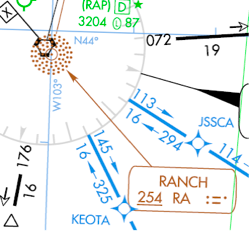
  • Ground facility 
    • Called NDB - non directional radio beacon
    • Transmits radio energy in all directions
    • Frequencies 
      • Not approved for IFR navigation but can be used for VFR
      • ADF receivers do not have a "flag" to warn the pilot when erroneous bearing information is being displayed
      • The pilot should continuously monitor the NDB's identification
  • ADF - automatic direction finder 
    • Equipment in the aircraft
    • Always points to the antenna 
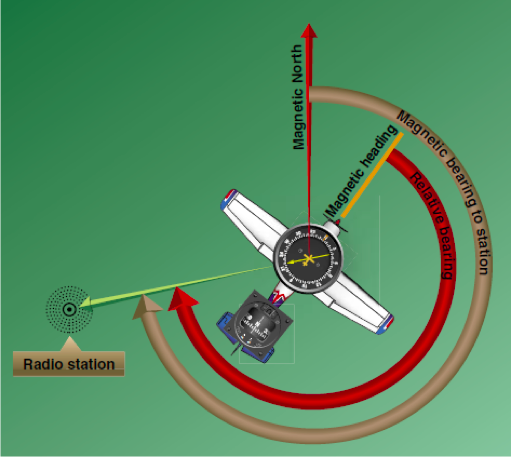
    • Shows you the relative bearing from the aircraft's magnetic heading to the transmitting station 
    • Can be a fixed card or a moveable card bearing indicator
    • MH + RB = MB

  • RMI - radio magnetic indicator 
    • ADF’s version of the HSI
    • Combines and ADF with a heading indicator connected to a fluxgate
    • MH + RB = MB

Ground Lesson 11: Physiology and aeronautical decision making

Aviation physiology
  • Vision in flight
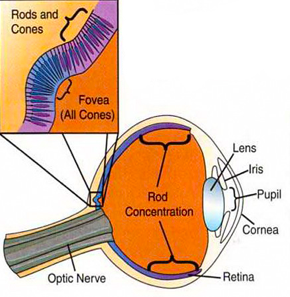
    • Vision is the result of the light striking the retina after entering through the cornea and passes through the lens
    • The retina contains many photosensitive cells called cones and rods, which are connected to the optic nerve
      • Cones 
        • Concentrated in the center of the retina
        • Function well in bright light and are sensitive to color

      • Rods
        • Function well in the dark
        • Responsible for much of your peripheral vision
        • 30 minutes for rods to adapt to the dark
        • Avoid lighted areas before your flight
  • Night vision 
    • 30 minutes for rods to adapt to the dark
    • Avoid lighted areas before your flight
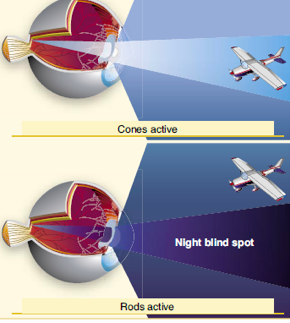
    • The concentration of cones concentrated in the fovea can create a blind spot at night in the center of your vision
        • Use your peripheral vision at night
        • Don't concentrate on an image while flying at night, it may start to fade


  • Visual illusions
    • Autokinesis
      • If you stare at a light for too long it may appear to be moving

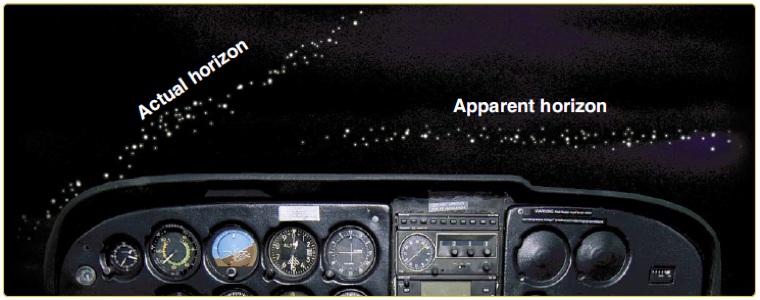
    • False horizon
      • The actual horizon may be obscured, and clouds and terrain may form a false horizon

    • Landing illusions 
      • Tendency to fly a lower-than-normal approach at night
      • Narrow runway
        • Looks like you're higher than you actually are

      • Wide runway
        • Looks like you're lower than you actually are

      • Downslope runway
        • Looks like you are lower

      • Upslope runway
        • Looks like you're higher

    • Night myopia
      • Nothing to focus on

    • Flicker vertigo

  • Disorientation
    • Human vestibular system 
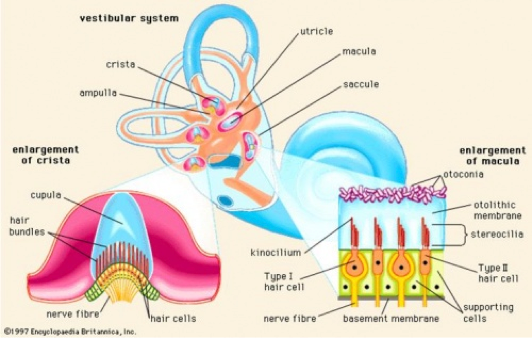
      • Motion sensing system in the ears
        • Sense of balance and orientation 
        • Bodies attitude indicator

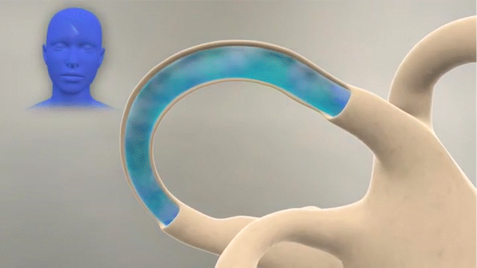
      • Small hairs surrounded by gelatinous liquid 
      • Hairs move instantly, but liquid lags behind due to inertia 
      • Not able to detect motion less than 2 - 3 degrees per second
      • Can lead to spatial disorientation

    • Spatial disorientation 
      • Not knowing your attitude 
      • Information conflict between your senses
      • Vestibular sense works good with visual visual sense

    • Motion sickness 
      • Conflict between visual sense and other sense
      • Symptoms 
        • Discomfort
        • Nausea
        • Paleness

  • Hypoxia
    • Definition
      • Lack of Oxygen in the body tissues due to decreased quantity and molecular concentration
    • Four types 
      • Hypoxic - lungs
        • Drop in oxygen pressure (altitude)
        • Oxygen requirements  FAR 91.211

      • Hypemic - blood
        • Reduced ability of the blood to carry oxygen (CO)

      • Stagnant - heart
        • Inability of the blood to reach tissue/organs(circulation/g-force)

      • Histotoxic - external
        • Inability of the tissue/organs to obtain oxygen (alcohol/drugs)

    • Symptoms 
      • Impaired judgement
      • Light headed
      • Headache
      • Blue fingernails/lips
      • Reduced vision

    • Corrective action: 
      • Oxygen
      • Don’t smoke
      • Stay healthy
      • Lower altitude

  • Hyperventilation
    • Not enough carbon dioxide in the blood
    • Over breathing reduces CO2 level in the blood
    • Causes
      • Anxiety or stress

    • Symptoms 
      • Similar to hypoxia

    • Correction 
      • Control breathing


Aeronautical decision making - (ground lesson one again)
  • Applying the decision-making process
    • You must make sure it is safe to fly during the whole flight
    • Avoid poor judgment chains
    • Aeronautical decision making models

    • DECIDE model
Detect
Changes in the condition of flight
Estimate
The need for correction action 
Choose
Desired outcome of corrective action 
Identify
Corrective action needed for the situation 
Do
The necessary action 
Evaluate
The effect of the action 


    • PPP model
Perceive →  given set of circumstances 
Process → by evaluating their inspection on flight safety
Perform → implementing the best course of action 


  • Risk assessment  - (next lesson)
    • PAVE model
      • Pilot
      • Aircraft
      • EnVironment
      • External pressure

  • Pilot-in-command responsibility
    • FAR  91.3
    • IMSAFE 
      • Illness
      • Medication
      • Stress
      • Alcohol
      • Fatigue
      • Eat

    • Hazardous flight attitudes

  • Communication
    • Work on effective listening 
      • If unclear, request clarification

    • Think before you transmit 
    • Read back clearances/ runway numbers, traffic

  • Workload management
    • Stay ahead of the aircraft
    • Doing as much as possible in advance will reduce stress during high workload situations 
    • Prioritize 
    • ANC → aviate, navigate, communicate
  • Situational awareness
    • Know your position 
    • Know positions of other aircraft's 
    • Know the terrain
    • Pay attention to ATC
    • Keep track of weather and wind
    • Know your aircraft
    • Keep an eye out for other factors that can affect your flight

  • Resource use
    • Be familiar with the aircraft equipment 
    • Use any available resource provided in the aircraft

  • Applying human factors training
    • Read private pilot handbook 10-39